
Have you ever wondered why some colors pop more vividly than others? The secret often lies in one simple factor: temperature.
Getting the optimal temperature just right can make your colors shine brighter and look more vibrant. Whether you’re painting, dyeing fabrics, or working with plants, understanding how temperature affects color enhancement can transform your results. Keep reading to discover how you can unlock the full potential of your colors by mastering this crucial element.
Your projects will never look the same again.
Color Temperature Basics
Color temperature describes the warmth or coolness of light. It affects how colors look in photos and rooms.
Understanding color temperature helps improve color appearance and mood in images and spaces.
Warm Vs Cool Tones
Warm tones have colors like red, orange, and yellow. They feel cozy and inviting.
Cool tones include blue, green, and purple. These colors feel calm and refreshing.
- Warm tones create a sense of comfort
- Cool tones give a peaceful and clean look
- Mixing tones affects the mood of the space or image
Color Temperature Scale
The color temperature scale measures light in Kelvin (K). Lower numbers mean warmer light.
Higher numbers show cooler light, like daylight or blue sky.
| Kelvin (K) | Description | Effect |
|---|---|---|
| 2000K – 3000K | Warm light (yellow to orange) | Cozy, soft, relaxing |
| 3500K – 4500K | Neutral white light | Balanced, natural look |
| 5000K – 6500K | Cool light (blueish white) | Bright, clear, alert |
Impact On Perception
Color temperature changes how we see colors and shapes. Warm light makes colors look softer.
Cool light makes colors appear sharper and more vivid. It also affects mood and focus.
- Warm light feels welcoming and relaxing
- Cool light feels fresh and energizing
- Choosing the right temperature improves color clarity
Choosing The Right Temperature
Temperature plays a big role in making colors look bright and clear. Picking the right temperature helps colors stand out more.
The right temperature depends on lighting, materials, and the environment. Understanding these can improve color quality.
Matching Color With Lighting
Light affects how we see colors. Warm light makes colors look softer. Cool light makes colors look sharper.
Choose a temperature that matches your light source. This keeps colors natural and clear.
- Use warm temperature (2700K-3000K) for cozy spaces
- Use neutral temperature (3500K-4100K) for balanced color
- Use cool temperature (5000K-6500K) for bright, true colors
Adjusting For Different Materials
Different materials show colors differently. Some reflect light well, others absorb it.
Adjust temperature to suit the material. This helps keep colors vibrant and accurate.
- Use cooler temperatures for shiny surfaces
- Use warmer temperatures for matte or rough surfaces
- Test colors on material before final choice
Environment Considerations
Room color and natural light affect how temperature changes color. Bright rooms may need cooler light.
Consider the room’s purpose and natural light when choosing temperature. This helps colors stay true all day.
- Rooms with sunlight may benefit from cooler light
- Rooms with dark walls may need warmer light
- Match temperature to how people use the space
Techniques To Boost Vibrancy
Color vibrancy depends a lot on temperature settings. Using the right temperatures can make colors pop and look richer. This guide explains how warm, cool, and mixed temperatures affect color enhancement.
Understanding these techniques helps improve the appearance of photos, designs, or even painted surfaces. Each method offers a unique way to enhance color intensity.
Using Warm Temperatures
Warm temperatures add a golden or reddish tone to colors. They increase the feeling of warmth and make reds, oranges, and yellows more vivid. This works well for autumn scenes and cozy settings.
- Increase temperature in photo editing software slightly above neutral.
- Use warm light sources like tungsten bulbs for photography.
- Apply warm filters to boost reds and yellows.
Leveraging Cool Temperatures
Cool temperatures bring out blues, greens, and purples. They create a fresh and calming effect. This is useful for nature photos, water scenes, or modern designs.
| Temperature Setting | Effect on Color |
| Below 5000K | Enhances blues and greens |
| 5000K to 6500K | Neutral color balance |
| Above 6500K | Warmer tones dominate |
Combining Temperatures For Effect
Mixing warm and cool temperatures gives depth to colors. It can highlight different parts of an image or design. This technique adds contrast and makes colors look more natural.
Try these combinations for color enhancement:
- Use warm light on the subject and cool background light.
- Apply warm filters on reds and cool filters on blues selectively.
- Adjust temperature sliders in editing tools to balance both tones.
Credit: www.mdpi.com
Tools For Temperature Control
Controlling temperature is important to make colors look their best. Different tools help keep the right temperature for color enhancement.
Using the right equipment helps keep colors bright and clear. This guide explains some tools to control temperature well.
Lighting Equipment
Lighting affects how colors appear. Some lights can change the temperature of a room, which changes color tones.
Special lighting equipment keeps a steady temperature. This helps colors stay true and consistent.
- LED lights produce less heat and keep color stable
- Color temperature adjustable lights create desired effects
- Softbox lights reduce harsh shadows and balance temperature
Digital Color Correction
Digital tools help fix colors after taking photos or videos. They adjust color temperature to make images look natural.
These tools let you change warm or cool tones. This improves color balance without changing physical lights.
- Software can shift color temperature in images
- Adjust white balance to fix color casts
- Use presets for common temperature settings
Temperature Sensors
Temperature sensors measure heat in the environment. They help keep the right temperature for color accuracy.
Sensors connect with devices to adjust heating or cooling. This keeps colors from changing due to temperature shifts.
- Infrared sensors detect surface temperatures
- Thermistors provide quick temperature readings
- Smart sensors connect to control systems automatically
Common Mistakes To Avoid
Keeping the right temperature helps bring out the best colors. Many people make errors that hurt color quality.
Learn what to watch for and how to avoid these common mistakes for better color results.
Overheating Colors
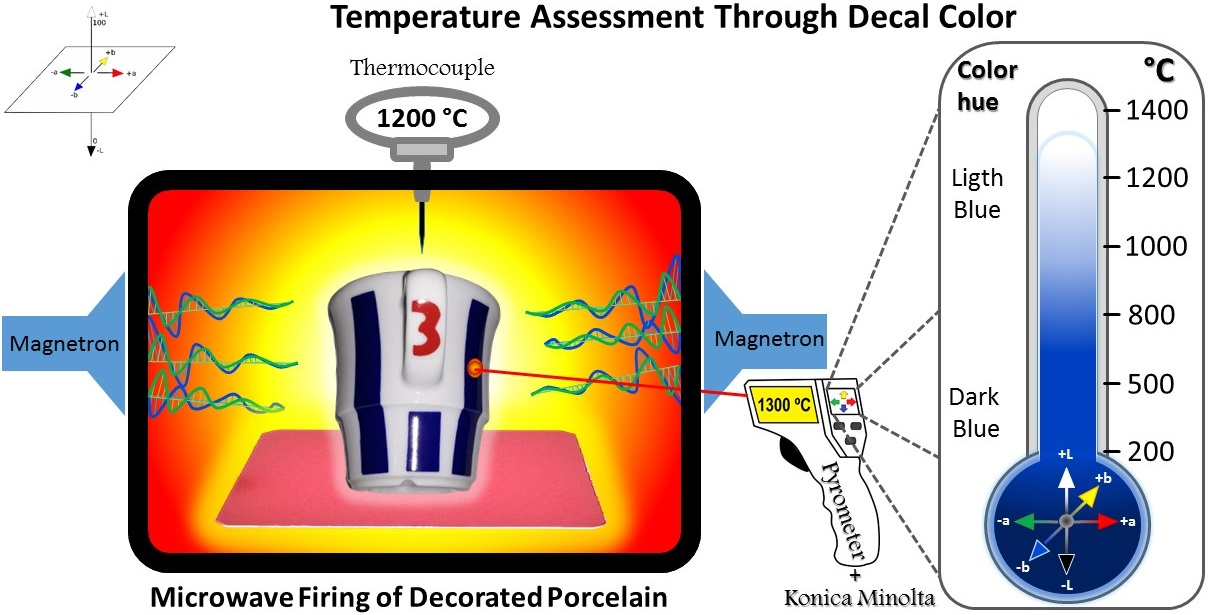
Too much heat can fade or change colors. Overheating causes bright shades to dull and lose their vibrancy.
- Do not set temperature too high for long periods.
- Avoid direct heat on sensitive color materials.
- Use recommended heat levels for each color type.
- Monitor temperature closely during heating processes.
Ignoring Ambient Light
Light around your workspace affects how colors look. Ignoring ambient light can lead to wrong color choices.
| Light Type | Effect on Colors |
| Natural Sunlight | Shows true colors but changes during day |
| Fluorescent Light | Can make colors look cooler or washed out |
| Incandescent Light | Makes colors warmer and deeper |
Misjudging Material Response
Different materials change color at different temperatures. Misjudging this leads to poor color results.
Check these tips to avoid mistakes with materials:
- Know how each material reacts to heat before applying temperature.
- Test small samples first to see color changes.
- Adjust heating time based on material type.
- Keep records of temperature and results for future reference.
Credit: microgreensworld.com
Case Studies And Examples
Understanding the right temperature can enhance colors in various settings. This can impact photography, interior design, and product displays.
Let’s explore how optimal temperatures affect these areas. We will look at real-world examples to see these effects.
Photography Scenarios
Photographers use temperature to improve image colors. Cooler temperatures make colors appear sharper and more vivid.
Warm temperatures can soften images. They add a cozy feel, which is great for portraits.
- Outdoor photography often uses cooler temperatures
- Studio portraits benefit from warmer settings
- Sunsets require careful balance to avoid color loss
Interior Design Applications
Interior designers use temperature to influence room colors. The goal is to create specific moods and atmospheres.
Warm temperatures make rooms feel inviting. They enhance earth tones and create comfort.
- Living rooms often use warm lights for coziness
- Offices may use cooler lights for focus
- Art galleries balance both for color accuracy
Product Display Strategies
Stores use temperature to improve product displays. Proper lighting can make products more appealing to customers.
Cooler temperatures highlight product details. Warm temperatures make products seem luxurious.
| Clothing Stores | Use warm lights for cozy feel |
| Electronics Stores | Use cool lights to highlight features |
| Jewelry Stores | Balance both to enhance sparkle |

Credit: www.reddit.com
Frequently Asked Questions
What Is The Best Temperature For Color Enhancement?
The optimal temperature for color enhancement typically ranges between 20°C to 25°C (68°F to 77°F). This range ensures vivid color development without fading or damage. Maintaining this temperature helps achieve consistent and vibrant results in various materials and processes.
How Does Temperature Affect Color Intensity?
Temperature directly impacts pigment molecules and dye absorption. Higher temperatures can intensify colors but risk fading. Lower temperatures may reduce color vibrancy. Controlling temperature ensures balanced color intensity and long-lasting results in color enhancement applications.
Can Color Enhancement Occur At Low Temperatures?
Color enhancement at low temperatures is possible but less effective. Cooler conditions slow pigment activation and dye bonding. This results in duller colors and uneven coverage. Optimal temperature control is essential for maximum color vibrancy and uniformity.
Why Is Temperature Control Crucial For Color Enhancement?
Temperature control prevents color fading, uneven tones, and material damage. It stabilizes pigment reactions and dye penetration. Proper temperature management enhances color durability and visual appeal. This leads to higher quality and more consistent color outcomes.
Conclusion
Finding the right temperature boosts color vibrancy well. Colors look brighter and last longer with proper heat. Too much heat can cause fading or damage. Too little heat may leave colors dull and weak. Stick to the ideal temperature for the best results.
This helps keep your items looking fresh and vivid. Remember, simple care makes a big difference in color quality. Try to control temperature during your color enhancement process. It’s an easy step that improves every project’s final look. Small changes lead to better, lasting color effects.